

openclaw-groupme







An OpenClaw channel plugin that brings your AI agent into GroupMe group chats. It hooks into GroupMe's Bot API via webhooks so your agent can receive messages, understand context, and reply — all within the group conversations your team (or friends) are already having. Group chats only; DMs are not supported by the GroupMe Bot API.
Requirements
- OpenClaw
>= 2026.9.7— this plugin targets the 2026.9.7 plugin SDK (channel ingress, routed inbound dispatch, and durable reply delivery). - Node.js
>= 24.16.0on 24.x, or>= 26.1.0— matches OpenClaw's runtime. - A reachable, public HTTPS endpoint for the GroupMe callback (see Prerequisites).
New to OpenClaw? Start with the OpenClaw docs and the channels overview.
Install
openclaw plugins install clawhub:openclaw-groupme --accept-capabilities
You can also install directly from npm if you want npm to be the explicit source:
openclaw plugins install npm:openclaw-groupme --accept-capabilities
OpenClaw asks you to review the declared capabilities of third-party plugins before installing them. This plugin declares a single groupme channel and no tools, hooks, or providers; run the install without --accept-capabilities to see the consent summary first.
After installing, restart the gateway so it picks up the new plugin:
openclaw gateway restart
That's it — the plugin is loaded and ready to configure. (It ships compiled, so there's no build step on your end.)
Prerequisites
Before you start wiring things up, make sure you have three things ready:
1. A GroupMe group
Bots in GroupMe live inside groups — there's no way to DM a bot directly. If you don't have one already, create a group using the GroupMe web app or one of the mobile apps. You can also use an existing group you're already in.
2. A GroupMe access token
Head over to dev.groupme.com to grab your access token.
Heads up: You must have a username and password set up on your GroupMe account to log in to the developer portal. The single sign-on options (Google, Microsoft, etc.) won't work here — only the classic email/phone + password login.
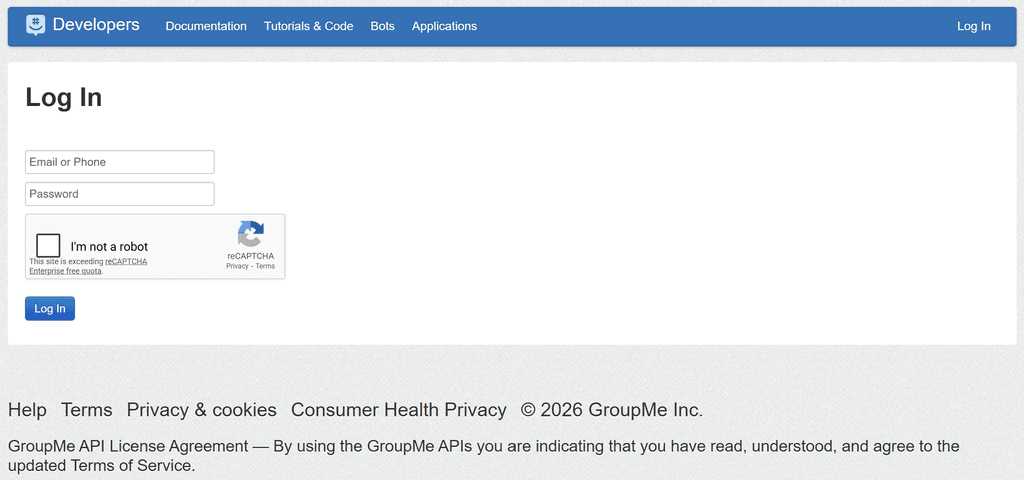
Once you're logged in, your access token is displayed in the top-right corner of the page. Click on it to copy.

Keep your access token secret. This token has full access to your GroupMe account — it can post messages, join groups, manage bots, and more. Treat it like a password. Unfortunately, the only known way to revoke a compromised token is to change your GroupMe password, which isn't documented anywhere by GroupMe. So guard it carefully.
3. A public HTTPS URL
GroupMe needs to reach your OpenClaw gateway over the internet to deliver messages. You'll need a public HTTPS URL that routes to your gateway's webhook endpoint.
How you set this up depends entirely on your environment — a reverse proxy (Nginx, Caddy, Traefik), a Cloudflare tunnel, ngrok, Tailscale, or any number of other approaches will work. The important thing is:
- The URL must be HTTPS (GroupMe requires it).
- Only expose the callback path (e.g.,
/groupme/...) — don't open your entire gateway to the public internet. - The domain must be live and reachable at setup time, because GroupMe pings the callback URL when you register a bot.
We can't cover every possible network setup here, but at the end of the day you need a public https://your-domain.com/groupme/... URL that reaches your OpenClaw gateway.
Setup: Interactive Wizard (Recommended)
The interactive wizard is the easiest way to get started. It creates a new GroupMe bot, registers the callback URL, and writes all the config for you.
1. Run the channel setup command:
openclaw channels add
You can also reach the same GroupMe wizard from the broader setup flows:
openclaw configure --section channelsor the first-runopenclaw onboard.
2. Choose GroupMe from the channel list (use the arrow keys to select it).
3. Enter a bot name. This is the display name your bot will use in the group (e.g., openclaw). This name is also used for mention detection.
4. Paste your GroupMe access token when prompted.
5. The wizard fetches your groups from GroupMe. Select the group you want the bot to live in.
6. Choose whether to require an @mention:
- Yes — The bot only responds when someone mentions it by name (e.g., "hey @openclaw, what's the weather?"). This is great for groups with multiple people where you don't want the bot jumping into every conversation.
- No — The bot responds to every message in the group. Perfect if you're the only human in the group and want a direct chat experience.
7. Enter the public domain that will host your callback URL. This should be the domain name (or public IP) that can reach your OpenClaw gateway — for example, bot.example.com. The wizard generates a secure callback URL with a random path and secret token, then registers the bot with GroupMe.
8. The wizard writes the config and shows a summary of what was created.
9. Restart the gateway:
openclaw gateway restart
10. Send a test message in the GroupMe group. If everything is wired up correctly, your bot should respond. Make sure your reverse proxy or port forwarding is configured to route the callback URL to your gateway.
After the wizard — hardening secrets (recommended for production): the wizard writes your
accessToken,botId, andcallbackTokenas plaintext literals inopenclaw.json. That's fine for local testing, but for production you should migrate them to SecretRefs so no plaintext credentials live in your config. See Secrets below.
Setup: Non-Interactive CLI
If you already have a GroupMe bot created (maybe from the Bots page on the developer portal) and want a scriptable setup, use the CLI flags directly:

openclaw channels add --channel groupme \
  --bot-id "YOUR_GROUPME_BOT_ID" \
  --access-token "YOUR_GROUPME_ACCESS_TOKEN" \
  --group-id "YOUR_GROUPME_GROUP_ID" \
  --callback-token "YOUR_CALLBACK_TOKEN" \
  --webhook-path "/groupme/callback"
For named accounts (useful if you're running multiple bots):
openclaw channels add --channel groupme \
  --account work \
  --name "Work Bot" \
  --bot-id "YOUR_GROUPME_BOT_ID" \
  --access-token "YOUR_GROUPME_ACCESS_TOKEN" \
  --webhook-path "/groupme/callback"
| Flag | Maps to config | Description |
|---|---|---|
--bot-id | botId | Your GroupMe Bot ID (--token is accepted as an alias) |
--access-token | accessToken | Your GroupMe access token |
--callback-token | callbackToken | Shared secret GroupMe sends as ?k= on the callback URL |
--group-id | groupId | The GroupMe group the bot belongs to |
--bot-name | botName | Bot name used for mention detection |
--webhook-url | webhookPath (+ callbackToken if a ?k= is present) | Full webhook URL; the path and k token are extracted |
--webhook-path | webhookPath (+ callbackToken if a ?k= is present) | Relative webhook route path |
--account | account ID | Named account identifier |
--name | name | Display name for the account |
Note: The non-interactive CLI does not set
requireMention,publicDomain, orallowFrom. Add those manually afterward, or use the interactive wizard to generate complete webhook settings. A?k=<token>on--webhook-url/--webhook-pathis parsed intocallbackTokenwhen--callback-tokenis not given.
After adding the channel, make sure the callback URL you gave GroupMe uses the configured webhookPath and callbackToken. Then restart the gateway:
openclaw gateway restart
Run openclaw channels add --channel groupme --help to see the GroupMe flags (they come from the plugin's setup contract, so they are listed without loading the plugin runtime).
Manual Config Example
If you prefer editing config files directly, here's what a complete setup looks like:
{
  "channels": {
    "groupme": {
      "enabled": true,
      "botName": "openclaw",
      "accessToken": "YOUR_GROUPME_ACCESS_TOKEN",
      "botId": "YOUR_GROUPME_BOT_ID",
      "groupId": "YOUR_GROUPME_GROUP_ID",
      "publicDomain": "bot.example.com",
      "webhookPath": "/groupme/e60b3e59da98950f",
      "callbackToken": "YOUR_SECRET_TOKEN",
      "requireMention": true
    }
  }
}
Multiple Accounts
Each GroupMe bot is bound to a single group, so running the bot in more than one group means configuring more than one account. Top-level fields act as the default account, and additional accounts live under accounts.<id>. Named accounts inherit any fields you don't override.
{
  "channels": {
    "groupme": {
      "enabled": true,
      "defaultAccount": "family",
      "botName": "openclaw",
      "accounts": {
        "family": {
          "name": "Family Bot",
          "accessToken": "FAMILY_ACCESS_TOKEN",
          "botId": "FAMILY_BOT_ID",
          "groupId": "FAMILY_GROUP_ID",
          "publicDomain": "bot.example.com",
          "webhookPath": "/groupme/family-a1b2c3",
          "callbackToken": "FAMILY_SECRET_TOKEN",
          "requireMention": false
        },
        "work": {
          "name": "Work Bot",
          "accessToken": "WORK_ACCESS_TOKEN",
          "botId": "WORK_BOT_ID",
          "groupId": "WORK_GROUP_ID",
          "publicDomain": "bot.example.com",
          "webhookPath": "/groupme/work-d4e5f6",
          "callbackToken": "WORK_SECRET_TOKEN",
          "requireMention": true
        }
      }
    }
  }
}
Each account needs its own webhookPath and callbackToken, since each registered bot has its own callback URL.
Reconfiguring an Existing Setup
If GroupMe is already configured and you run openclaw configure --section channels (or openclaw channels add) again, you'll get a menu of targeted actions instead of repeating the full wizard:
- Skip — leave everything as-is
- Rotate access token — replace the stored access token (validates the new token by fetching your groups)
- Change group — pick a different GroupMe group and optionally register a new bot in it
- Regenerate webhook settings — create a new random webhook path and callback token (you'll need to update the bot's callback URL in GroupMe afterward)
- Toggle requireMention — flip mention-required mode on or off
- Update public domain — change the public domain used for callback URLs
- Full re-setup — start from scratch with the interactive wizard
This lets you make quick adjustments — like rotating a leaked token or moving the bot to a different group — without tearing down the whole config.
Response Modes
Always respond (requireMention: false)
The bot replies to every message in the group. Simple and direct.
{
  "channels": {
    "groupme": {
      "requireMention": false
    }
  }
}
Mention only (requireMention: true, default)
The bot only replies when someone mentions it by name. It still passively buffers recent messages so it has context when it does respond.
{
  "channels": {
    "groupme": {
      "requireMention": true,
      "historyLimit": 30
    }
  }
}
Set historyLimit: 0 to disable history buffering entirely.
How Mention Detection Works
GroupMe bots don't support native @mention entities, so this plugin uses text matching. By default, it matches the botName in the message text. You can add custom patterns too:
{
  "channels": {
    "groupme": {
      "botName": "openclaw",
      "mentionPatterns": [
        "@openclaw",
        "hey openclaw",
        "oc"
      ]
    }
  }
}
Patterns are case-insensitive regular expressions, so you can get creative with matching.
Security
The plugin ships with some security defaults out of the box. Replay protection and rate limiting are always on — you don't need to configure anything for a solid baseline.
Inbound Webhook Pipeline
Every incoming webhook request goes through this gauntlet before your agent ever sees it:
- Method check — Only
POSTrequests are accepted (405 for everything else) - Callback token auth — The
kquery parameter in the callback URL is verified againstcallbackTokenusing timing-safe comparison - Proxy validation — If configured, validates trusted proxy headers, allowed hosts, and HTTPS protocol
- Body parsing — 64KB size limit, 15-second timeout
- Payload parsing — Extracts the GroupMe callback data and filters out bot messages, system messages, and empty messages
- Group binding — Verifies the inbound
group_idmatches the configuredgroupId - Replay protection — SHA-256 keyed deduplication with a sliding TTL window
- Rate limiting — Per-IP, per-sender, and global concurrency caps
Accepted requests get an immediate 200 ok and the message is processed asynchronously, so GroupMe never waits on your agent. The post-acknowledgement work is tracked by the gateway, so a restart or drain waits for in-flight replies instead of dropping them.
After the webhook pipeline, OpenClaw's channel ingress decides whether the message starts an agent turn: the sender allowlist (allowFrom), control-command authorization, and mention activation (requireMention). Replies go out through OpenClaw's durable delivery queue, so a reply that was accepted but not yet sent is recovered after a gateway restart.
Outbound Media Security
When the bot sends image replies, outbound media fetches are hardened with:
- SSRF guard with private-network blocking (enabled by default)
- MIME type allowlist (images only by default)
- Download size limit (15 MB)
- Request timeout (10 seconds)
Security Config Reference
You only need a security block if you want to override the defaults. Just include the fields you want to change:
{
  "channels": {
    "groupme": {
      "security": {
        "rateLimit": {
          "maxRequestsPerIp": 60
        },
        "proxy": {
          "trustedProxyCidrs": ["10.0.0.0/8"],
          "allowedPublicHosts": ["bot.example.com"],
          "requireHttpsProto": true
        }
      }
    }
  }
}
Replay Protection
| Field | Type | Default | Description |
|---|---|---|---|
security.replay.ttlSeconds | number | 600 | How long (in seconds) to remember message IDs for deduplication |
security.replay.maxEntries | number | 10000 | Maximum number of entries in the replay cache |
Rate Limiting
| Field | Type | Default | Description |
|---|---|---|---|
security.rateLimit.windowMs | number | 60000 | Sliding window size in milliseconds |
security.rateLimit.maxRequestsPerIp | number | 120 | Max webhook requests per IP per window |
security.rateLimit.maxRequestsPerSender | number | 60 | Max webhook requests per GroupMe sender per window |
security.rateLimit.maxConcurrent | number | 8 | Max concurrent inbound message executions |
Media
| Field | Type | Default | Description |
|---|---|---|---|
security.media.allowPrivateNetworks | boolean | false | Allow fetching media from private/internal networks |
security.media.maxDownloadBytes | number | 15728640 | Max download size for outbound media (bytes) |
security.media.requestTimeoutMs | number | 10000 | Timeout for outbound media fetch requests (ms) |
security.media.allowedMimePrefixes | string[] | ["image/"] | Allowed MIME type prefixes for outbound media |
Inbound vs. outbound media limits: the
security.media.*settings above govern outbound media — images the bot downloads from a URL and re-uploads to GroupMe. The separate top-levelmediaMaxMbfield governs inbound media the OpenClaw runtime fetches from GroupMe callbacks. They are independent knobs.
Logging
| Field | Type | Default | Description |
|---|---|---|---|
security.logging.redactSecrets | boolean | true | Redact callback secrets in logs and status output |
security.logging.logRejectedRequests | boolean | true | Log rejected webhook requests |
Command Bypass
| Field | Type | Default | Description |
|---|---|---|---|
security.commandBypass.requireAllowFrom | boolean | true | Require sender to be in allowFrom list to use control commands. Setting false lets any group member run them. |
security.commandBypass.requireMentionForCommands | boolean | false | Require mention even for control commands |
Proxy Validation
Include a proxy block to enable trusted-proxy validation. This is useful when your gateway sits behind a reverse proxy and you want to validate forwarded headers.
| Field | Type | Default | Description |
|---|---|---|---|
security.proxy.trustedProxyCidrs | string[] | [] | Only trust X-Forwarded-* headers from these CIDRs |
security.proxy.allowedPublicHosts | string[] | [] | Allowed values for the effective public host |
security.proxy.requireHttpsProto | boolean | false | Require the effective protocol to be HTTPS |
security.proxy.rejectStatus | number | 403 | HTTP status for proxy-policy rejections (400, 403, or 404) |
Secrets
botId, accessToken, and callbackToken are OpenClaw secret inputs. You can store literal values, but for production the recommended approach is SecretRefs so no plaintext credentials live in your config — this matches OpenClaw's secrets guidance and how official channels like Slack and Discord document setup. Plaintext is fully supported and fine for quick local testing.
The plugin does not read environment variables on its own. To keep credentials in the environment (for example GROUPME_BOT_ID, GROUPME_ACCESS_TOKEN, and GROUPME_CALLBACK_TOKEN), reference them from config with env-backed SecretRefs (shown below); OpenClaw resolves them at startup. Setting the env vars alone, without a SecretRef in config, is not enough to configure the channel.
{
  "channels": {
    "groupme": {
      "botId": { "source": "env", "provider": "default", "id": "GROUPME_BOT_ID" },
      "accessToken": { "source": "env", "provider": "default", "id": "GROUPME_ACCESS_TOKEN" },
      "callbackToken": { "source": "env", "provider": "default", "id": "GROUPME_CALLBACK_TOKEN" },
      "groupId": "YOUR_GROUPME_GROUP_ID",
      "webhookPath": "/groupme/callback"
    }
  }
}
SecretRefs also support file- and exec-backed providers, and work per account (under accounts.<id>), not just the default account.
Migrating wizard-written plaintext to SecretRefs
The setup wizard writes plaintext credentials. To convert them to SecretRefs (and scrub the plaintext residue), use OpenClaw's secrets workflow — GroupMe's botId, accessToken, and callbackToken are registered targets, so they show up in the planner automatically:
openclaw secrets configure          # plan the migration (interactive)
openclaw secrets apply --from <plan> # write SecretRefs and scrub plaintext
openclaw secrets audit --check       # verify no plaintext residue remains
openclaw secrets reload              # re-resolve refs into the runtime snapshot
Config Reference
| Field | Type | Default | Description |
|---|---|---|---|
enabled | boolean | true | Whether the GroupMe channel/account is active; only an explicit false disables it. An account still needs a botId before it will actually run. |
name | string | — | Display name for the account |
botId | secret input | — | GroupMe Bot ID |
accessToken | secret input | — | GroupMe access token (required for image uploads and the interactive wizard) |
callbackToken | secret input | — | Secret expected in the inbound k query parameter |
botName | string | — | Bot display name, used for mention detection |
groupId | string | — | Expected GroupMe group_id for inbound binding |
publicDomain | string | — | Public domain where the gateway is reachable (e.g., bot.example.com) |
webhookPath | string | /groupme | Relative webhook route path |
requireMention | boolean | true | Only respond when mentioned by name |
historyLimit | number | 20 | Max buffered messages per group (when requireMention: true); 0 disables buffering |
mentionPatterns | string[] | — | Custom regex patterns for mention detection |
allowFrom | array | — | Sender allowlist ("*" allows everyone) |
textChunkLimit | number | 1000 | Max characters per outbound text chunk (capped at GroupMe's 1000-char limit) |
responsePrefix | string | — | Text prepended to each outbound reply |
blockStreaming | boolean | unset (OpenClaw default) | Override block streaming for this channel. When unset, OpenClaw's dispatcher default applies; set true to stream completed assistant blocks as separate messages, or false to send a single final reply |
blockStreamingCoalesce | object | — | Fine-tunes how streamed blocks are coalesced (see OpenClaw docs) |
markdown | object | — | Markdown rendering overrides for outbound messages |
mediaMaxMb | number | — | Max size (MB) for inbound media the OpenClaw runtime fetches from GroupMe. Distinct from security.media.maxDownloadBytes, which caps outbound media the bot downloads before re-uploading. |
security | object | — | Security overrides (see Security section above) |
accounts | object | — | Named accounts (accounts.<id>), each accepting the fields above |
defaultAccount | string | — | Which named account is the default for outbound routing |
Webhook URL Format
The plugin stores the route path and secret separately:
{
  "webhookPath": "/groupme/e60b3e59da98950f",
  "callbackToken": "775c9958da544c73e6d97c04f884957caa174c8570889bbaa0900d6253f20bbc"
}
The full URL you register with GroupMe is your public domain plus the path and k token:
https://bot.example.com/groupme/e60b3e59da98950f?k=775c9958da544c73e6d97c04f884957caa174c8570889bbaa0900d6253f20bbc
Upgrading from 0.5.x
Version 0.6 moves the plugin onto the OpenClaw 2026.9.7 plugin SDK. Your existing channels.groupme config keeps working; the changes are in the host requirements and a few edges:
- OpenClaw
>= 2026.9.7and Node.js>= 24.16.0are required. Older gateways cannot load this version. - Installs need
--accept-capabilities(OpenClaw's capability consent for third-party plugins). --bot-idis the newchannels addflag for the bot ID (--tokenstill works), and--group-id,--callback-token, and--bot-nameare now available.security.commandBypass.requireAllowFrom: falsenow always lets any group member run control commands. Previously it only took effect together with the removed globalcommands.useAccessGroups: false.- Outbound message IDs are real GroupMe IDs. The Bot API does not return one, so with
accessTokenconfigured the plugin reads it back from the group feed right after posting. WithoutaccessTokenthe send is reported as unconfirmed (OpenClaw 2026.9.x showsadapter_returned_no_identity) instead of the random IDs earlier versions invented. - Unconfigured accounts (no
botId) report a blocked status instead of failing startup in a restart loop.
Notes and Limitations
GroupMe Bot API Constraints
GroupMe bots are intentionally limited compared to full user accounts. These constraints come from the GroupMe Bot API itself, not from this plugin:
- Group chats only — bots cannot send or receive direct messages. Each bot is bound to a single group.
- One group per bot — a bot registration is tied to exactly one group. To serve multiple groups, register a separate bot (and account) for each.
- No message history — bots only see messages as they arrive via the callback webhook. They cannot fetch past messages from the group. (This plugin buffers recent messages locally for context when
requireMentionis enabled.) - No reactions — bots cannot like or unlike messages.
- Text and images only — bots can post text and attach a single image per message. Other attachment types (video, files, locations) are not supported.
Plugin-Specific Notes
- Bot and system messages from GroupMe are automatically ignored
- GroupMe has a 1000-character limit per message — longer replies are chunked automatically
accessTokenis strongly recommended: it lets the plugin confirm each sent message's GroupMe ID (OpenClaw treats sends without one as unconfirmed), and image replies need it to upload to GroupMe's Image Service. Images can come from publichttpsURLs or from files the agent generates in its workspace (read through OpenClaw's scoped media roots)- GroupMe renders plain text, so the plugin tells the agent to avoid Markdown and strips assistant-only markup from replies
- The interactive wizard registers the bot with GroupMe using your
publicDomain, so your domain must be live and reachable during setup - If you change your domain later, update
publicDomainin your config and update the bot's callback URL at dev.groupme.com/bots
Troubleshooting
-
Bot doesn't respond:
- Is your webhook URL public, HTTPS, and matching
webhookPathpluscallbackToken? - Does
groupIdmatch the actual GroupMe group ID? - Is
botIdcorrect? - If
requireMention: true, are you mentioning the bot by name? - Check
allowFromif you have a sender allowlist configured
- Is your webhook URL public, HTTPS, and matching
-
Webhook returns 404 or 403:
- Verify the
ktoken in the URL matchescallbackToken - Check
groupIdbinding - If using proxy validation, check your
security.proxysettings
- Verify the
-
Bot responds but has no context:
- Make sure
historyLimitis not0 - History buffering only applies when
requireMention: true
- Make sure
-
Image replies fail:
- Make sure
accessTokenis configured - Only
image/*content is accepted (seesecurity.media.allowedMimePrefixes)
- Make sure
-
openclaw message sendreportsadapter_returned_no_identity:- The message was posted, but its ID could not be confirmed. Configure
accessTokenso the plugin can look it up in the group feed.
- The message was posted, but its ID could not be confirmed. Configure
-
openclaw channels statusshows GroupMe as blocked:- The account has no
botId; the webhook is not registered until one is configured
- The account has no
-
Bot registration fails with "callback URL validation has failed":
- GroupMe pings the callback domain when you register a bot
- Your public domain must be live and reachable at setup time
- Test it:
curl -I https://your-domain.com
-
Check runtime logs:
openclaw channels logs --channel groupme
- Check channel status:
openclaw channels status --probe
Resources
- OpenClaw documentation · Channels · Plugins
- GroupMe developer portal · Bots
- Contributing guide · Security policy · Changelog