
WebSculpt


Contents
- 1. Install
- 2. Usage
- 3. Core Concepts
- 4. AnyTrend Case Study
- 5. Key Design Choices
- 6. Documentation
- 7. Usage Statement
- 8. License
1. Install
Prerequisites: Node.js >= 22
1.1 Via npm
# 1. Install CLI tool
npm install -g @playwright/cli@0.1.13 websculpt

# 2. Install Skills for Agent (installs into all global Agent directories)
websculpt skill install --global --lang en

# Optional: install only to specific agents (claude / codex / agents / workbuddy, comma-separated)
# websculpt skill install --global --agents claude --lang en

# Optional: install only for the current project
# websculpt skill install --lang en
Manage with websculpt skill status / websculpt skill uninstall. See the skill section in docs/CLI.md for full options.
1.2 Via OpenClaw Plugin
openclaw plugins install clawhub:@bqw1013/websculpt-plugin --acknowledge-clawhub-risk
2. Usage
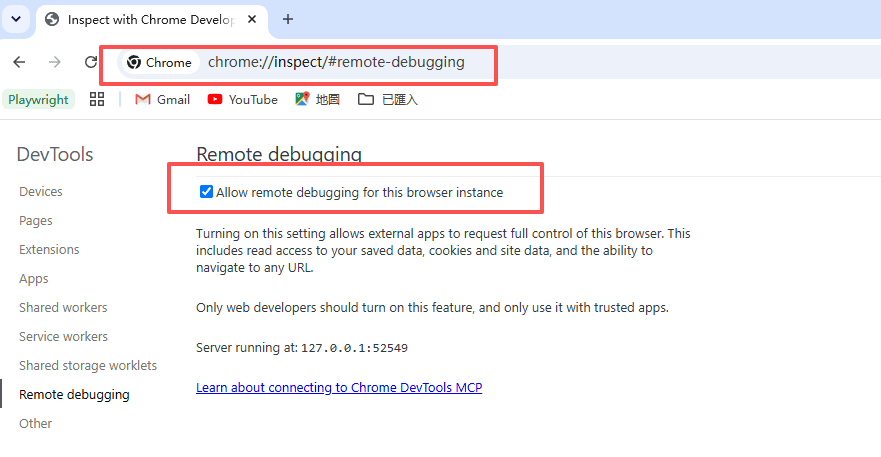
2.0 Prerequisite: Enable Chrome Remote Debugging
Before letting the Agent use your browser:
- Open
chrome://inspect/#remote-debuggingin the Chrome address bar - Check "Allow remote debugging" and keep Chrome running
Without this, the Agent cannot connect to your browser.
2.1 Via Agent
After installation, you can invoke one of the following three Skills directly in your Agent. You can also simply describe what you need and let the Agent choose.
Explore: Get External Information
/websculpt-explore Use my browser to show me the top 5 repositories on GitHub Trending
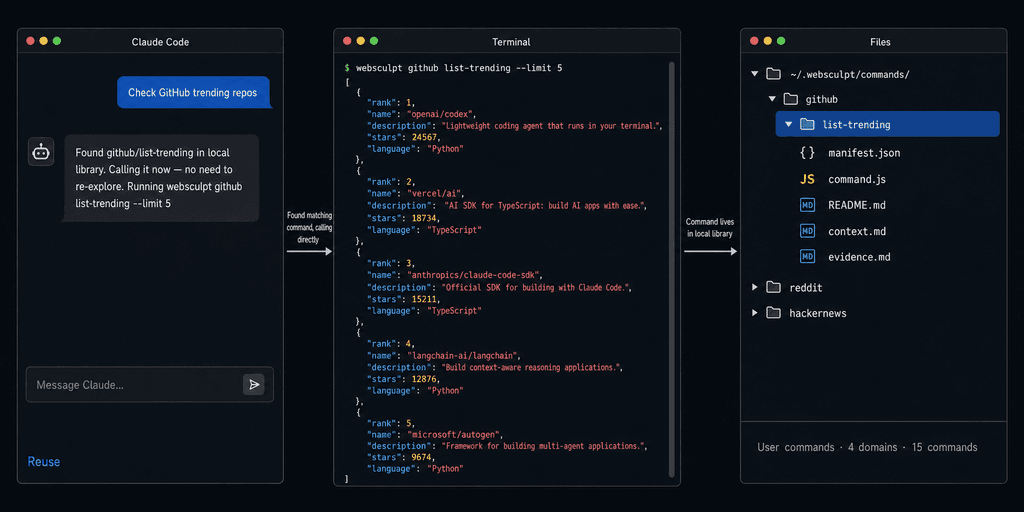
If a relevant memory already exists as a local CLI command, the Agent reuses it directly instead of exploring the website again. This significantly reduces context and token usage while making execution faster and more reliable.
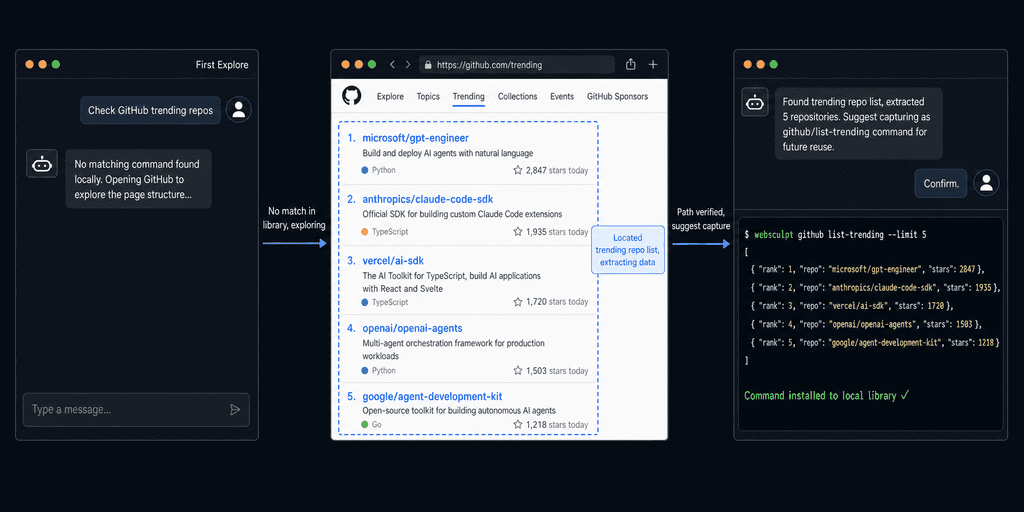
Only when no matching command exists does the Agent explore a website, API, or browser session. If the path is worth reusing, it asks for your confirmation before distilling it into a new command.
Maintain: Repair or Extend a Command
/websculpt-maintain The GitHub Trending command stopped working. Please fix it
Use it to repair broken commands, add parameters, or adjust their output.
Library: Manage and Migrate the Command Library
/websculpt-library Export the GitHub Trending command to ./github-commands
/websculpt-library Import the commands from ./github-commands into my local command library
It can also narrow the commands shown in the current project, or back up, migrate, and share the entire library.
2.2 CLI Commands: Executable Memory
WebSculpt saves a verified information retrieval path as a local CLI command. For example:
websculpt github list-trending --limit 5
Here, github/list-trending stores the complete browser automation path for opening GitHub Trending and extracting repositories; --limit 5 requests the first five results.
Running this command directly reuses that browser automation memory, without analyzing the page or rediscovering the data path.
# List available commands
websculpt command list

# View command usage
websculpt github list-trending --help

# Reuse the command directly
websculpt github list-trending --limit 5
2.3 Core Logic: Explore Once, Reuse Long Term
Existing Memory: Call It Directly
When the Agent finds a matching command, it calls it directly from the local command library.
No Existing Memory: Explore and Distill
After completing the exploration and delivering the result, the Agent asks for your confirmation if the path is worth reusing. Once confirmed, the internal Capture pipeline generates and validates a new command so it can be called directly next time.
3. Core Concepts
3.1 Skills and Self-Evolution
WebSculpt provides four Skills, delivered to the user's Agent, covering the complete lifecycle of a command:
| Skill | What It Does | When It Triggers |
|---|---|---|
| Explore | Checks the command library first for reuse, explores new paths when no match is found | Every time external information is needed |
| Capture | Solidifies a verified path into a command, installed after passing a state machine and validation gates | Explore finds a reusable path, user agrees to distill |
| Maintain | Repairs broken commands: reverse-imports into a workspace, re-explores page structure, overwrites the installed version | Command execution fails, or iteration is needed |
| Library | Manages the command library: scope whitelists, export/import for migration and sharing | Library grows and needs governance or sharing |
Connect the four Skills together, and you get a self-evolving command library:
- Explore → Capture: the library grows. Each successful exploration and distillation adds one command to the library. The Agent calls it directly next time instead of re-exploring. This is not developers writing new features — every use makes the library a little stronger.
- User overrides Builtin: the library improves. For the same
github/list-trending, your distilled version replaces the builtin one. Library quality improves with use, not with releases. - Maintain → Capture overwrite: the library self-heals. When a website redesign breaks a command, Maintain pulls it back into a workspace, re-explores the page structure, repairs it, and overwrites the installed version. Commands don't rot — they evolve alongside their target websites.
In addition, the websculpt/ and websculpt-en/ directories at the repository root are bootstrap skills (Chinese/English) distributed through skill marketplaces; they are not part of the lifecycle above. Their only job is to probe the environment on the Agent's first trigger, install the CLI, and land the four lifecycle skills via skill install, after which they go dormant. They are not shipped with the npm package and are not managed by skill install, which is why they live outside skills/.
3.2 Commands
WebSculpt has two types of commands:
- Meta commands: Manage the CLI and command library, such as
explore,capture,command,skill,scope. Built into the system, cannot be overridden. - Extended commands: Reusable information retrieval workflows, invoked by
domain/action(e.g.,github/list-trending). Further divided into:- Builtin commands: Distributed with WebSculpt
- User commands: Distilled by the Agent into
~/.websculpt/commands/. User commands take priority over Builtin, automatically overriding on name collision.
Each extended command consists of the following files:
| File | Purpose |
|---|---|
manifest.json | Metadata: description, runtime, parameter list |
command.js | Execution logic |
README.md | Caller-facing documentation |
context.md | Maintainer-facing context: distillation background, page structure, failure signals |
evidence.md | Exploration evidence: verified URLs, selectors, failure signals |
3.3 Runtime
Extended commands support two runtimes:
| Runtime | Execution Method | Use Case |
|---|---|---|
node | CLI process directly imports the command module | HTTP requests, public APIs, data cleansing |
browser | Background daemon process connects to Chrome via Playwright | DOM manipulation, page navigation, login state |
The browser runtime reuses the login state and cookies of the currently open Chrome. The Agent never touches your credentials.
3.4 Command Library Management
Scope — Controlling Visibility
As the command library grows, websculpt command list may show many commands irrelevant to the current project. Scope maintains a whitelist in the project directory so command list and help only display relevant commands.
- Scope only affects the display of
command list, not command execution. Commands outside the whitelist can still be invoked directly. - When no Scope exists in the current directory, the nearest ancestor Scope is used automatically. When none is found, all commands are shown.
- Newly installed commands via
capture finalizeare automatically added to the current project's Scope.
websculpt scope init                    # Enable scope
websculpt scope add github              # Add an entire domain
websculpt scope add github list-trending  # Add a single command
websculpt scope remove github           # Remove
websculpt scope show                    # View current whitelist
websculpt scope destroy                 # Disable

websculpt command domains               # Browse visible domains (scope-aware)
websculpt command list github           # List commands under one domain
Export / Import — Migration and Sharing
The command library can be exported as a plain directory for backup, machine migration, or team sharing. Imported commands are validated automatically to ensure package integrity.
# Export all commands
websculpt command export --to ./my-commands

# Export a specific domain
websculpt command export github --to ./my-commands

# Import a command package
websculpt command import --from ./my-commands

# Preview import result (dry run, no writes)
websculpt command import --from ./my-commands --dry-run
All commands in the package undergo L1–L3 layered validation before import. If any command fails validation, the entire import is aborted with no files written. Existing commands with the same name are skipped by default; use --force to overwrite.
4. AnyTrend Case Study
AnyTrend is a multi-platform trending news daily report system built on WebSculpt commands. It automatically scans multiple platforms every day, aggregates global trending topics, and generates a daily report.
Behind the scenes, it's not the Agent starting from scratch every day — it's a set of already-distilled WebSculpt commands running reliably. From the initial exploration of each platform's trending pages, to distilling each into a command, to scheduling daily execution, AnyTrend demonstrates WebSculpt's complete closed loop: explore once, reuse forever.
For detailed implementation and the full command list, see the AnyTrend repository.
5. Key Design Choices
5.1 Four-Skill Phased Delivery
WebSculpt's functionality is divided into four sequentially connected Skills — Explore discovers paths → Capture solidifies commands → Maintain keeps them healthy → Library governs and migrates. Each Skill is not a standalone tool but a phase in a single chain; the output of one phase is the input to the next.
5.2 Explore: Document Soft Constraints + Filesystem Truth
Explore constrains the Agent's tool selection: must check the command library first for reuse, only allowed to explore new paths when no match exists; when browser automation is needed, converge to the single protocol of Playwright CDP connecting to the current browser.
Constraints are enforced through two mechanisms:
- Document soft constraints: Skill documents define protocol flows; the Agent follows the rules.
- Filesystem truth: The Agent writes exploration traces to
trace.md;explore assessperforms structured audits (heading completeness, non-empty content, keyword safety rules, Assessment H3 subsection checks), blocking entry to Capture until passed.
5.3 Capture: CLI State Machine + Artifact Pipeline
Capture introduces CLI hard constraints on top of Explore's foundation:
- The Agent doesn't need to understand the full flow — it loops
capture statusand advances according to the returnednext.action. - The distillation process is split into 6 Artifacts (evidence → command → manifest → readme → context → validation), advancing with strict layered dependencies.
- Evidence Audit, Draft Fingerprint, and 4 sets of real-world tests form hard gates; finalize is blocked until all are passed.
5.4 Maintain: Repair Is Also Capture
Maintain doesn't invent a separate mechanism — it's essentially a Capture workflow with pre-filled context. Installed commands are reverse-imported via capture import into a workspace, modified, and then re-run through the state machine → validate → finalize --force. This ensures repairs are subject to the same validation gates as new commands — no bypassing just because "it's just a quick fix."
6. Documentation
Usage
docs/CLI.md— Usage, parameters, and output contracts for all commands
Design and Implementation
docs/Capture.md— Distillation workflow: six-artifact pipeline, state machine, hard-gate installationdocs/Architecture.md— Four-layer system architecture and code organizationdocs/Daemon.md— Background browser process, IPC protocol, and resource management
7. Usage Statement
When using WebSculpt, please comply with the target website's robots.txt and Terms of Service. Use it only on publicly accessible data you are permitted to access; unauthorized data collection is prohibited.
8. License
Apache-2.0